For photojournalists · iPhone now, Android later
Cull, caption and file from your iPhone.
Pick from the camera roll, dictate the story once, check every caption and send it all to the desk's server. Culling, captions and checks happen on the phone.
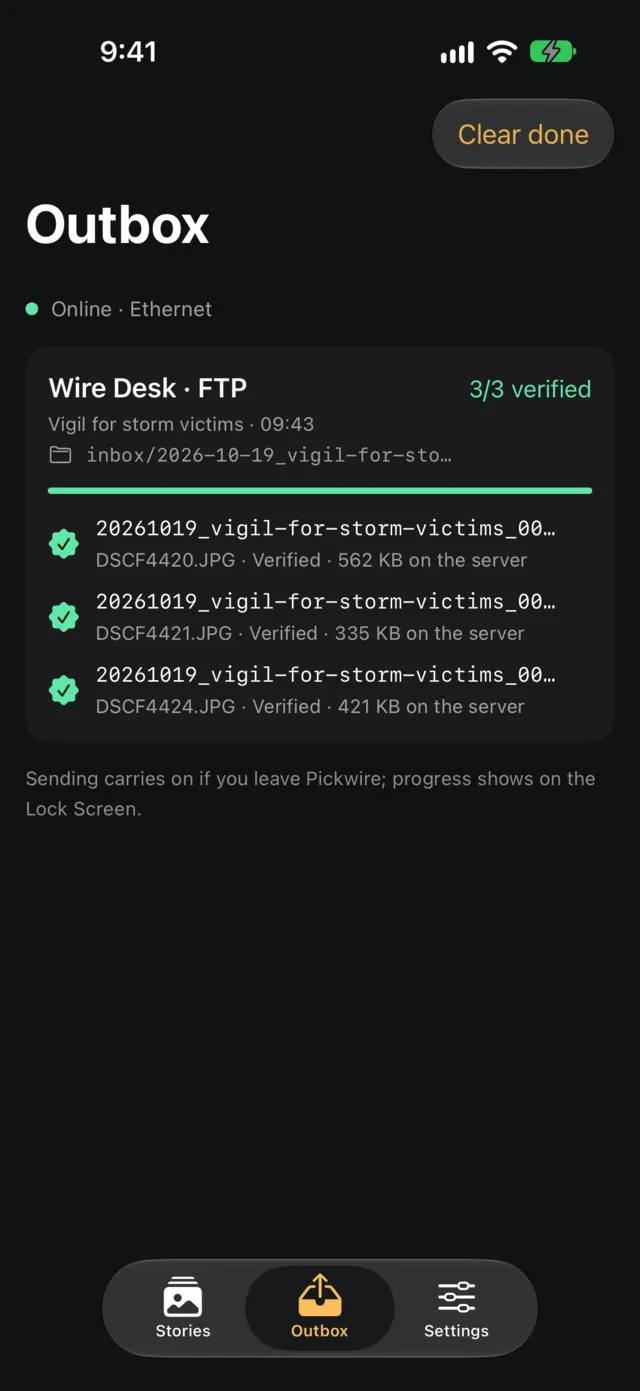
- SendEvery file is size-checked on the server before it's renamed into place.
- CaptionDictate once. Every photo gets its own caption, with place and date.
- CheckA name you never said blocks sending. Numbers that aren't in your notes are flagged.
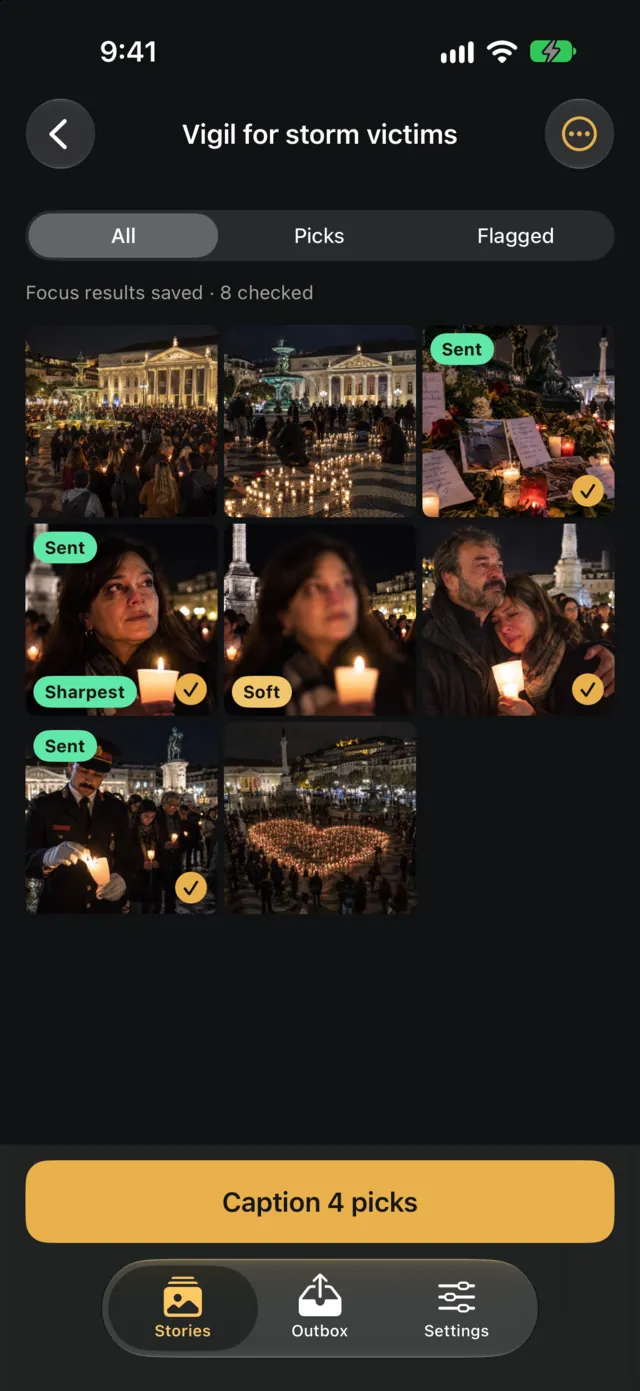
- FocusSharp means the eyes are sharp. Every frame is checked on the phone.
Send
Every file arrives whole, or you know it didn't.
The desk picks up whatever lands in its folder. Pickwire makes sure only complete files ever land there.
- Uploaded as name.part, size-checked on the server, then renamed. A half-sent file never appears under its real name.
- Waits for a network and keeps going after you close the app. One file at a time; retry what failed.
- Only new picks go. Pick one more frame later and it says “Send 1 new pick, 3 of 4 already sent”.
- Cancel a job or a single photo. Its half-sent file is deleted from the server.
- The email to the desk is ready when the batch lands. A notification opens it filled in. You tap Send.
- FTP, SFTP or Share as files, to as many servers as you need. If an SFTP server's key changes, nothing is sent.
Each file, over FTP
STOR DSCF4421.JPG.part
SIZE DSCF4421.JPG.part 4812337 ✓
RNFR DSCF4421.JPG.part
RNTO DSCF4421.JPG      delivered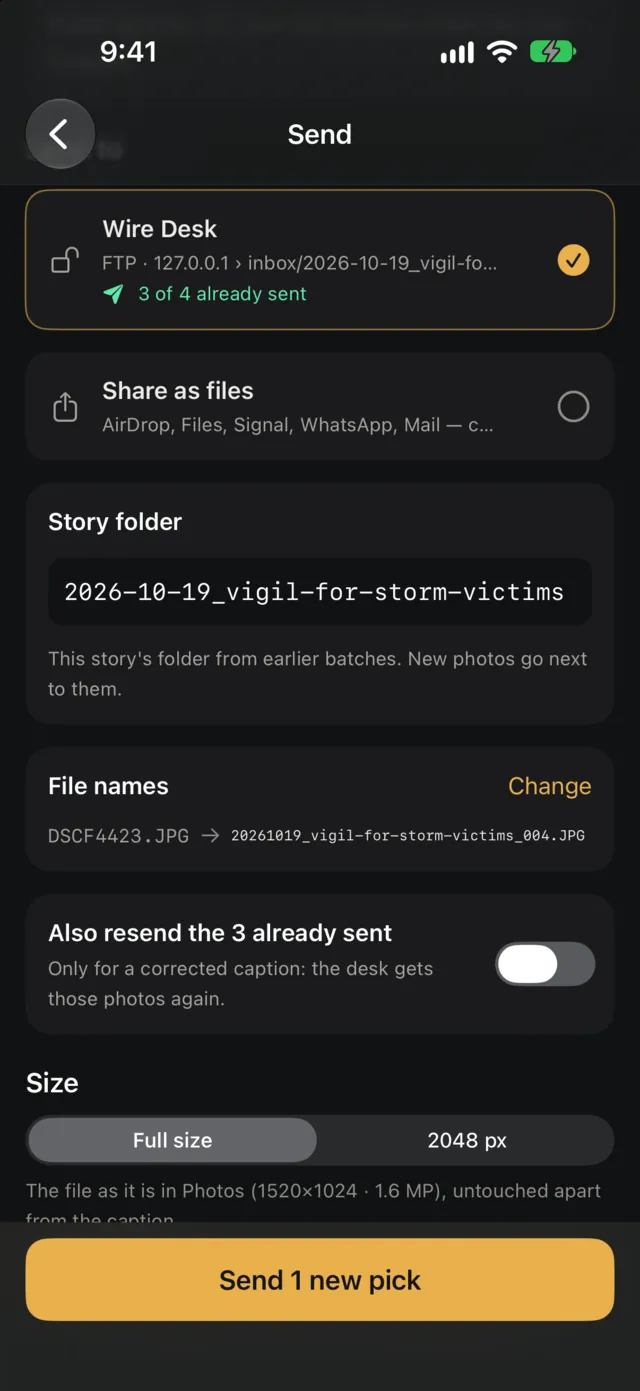
Caption
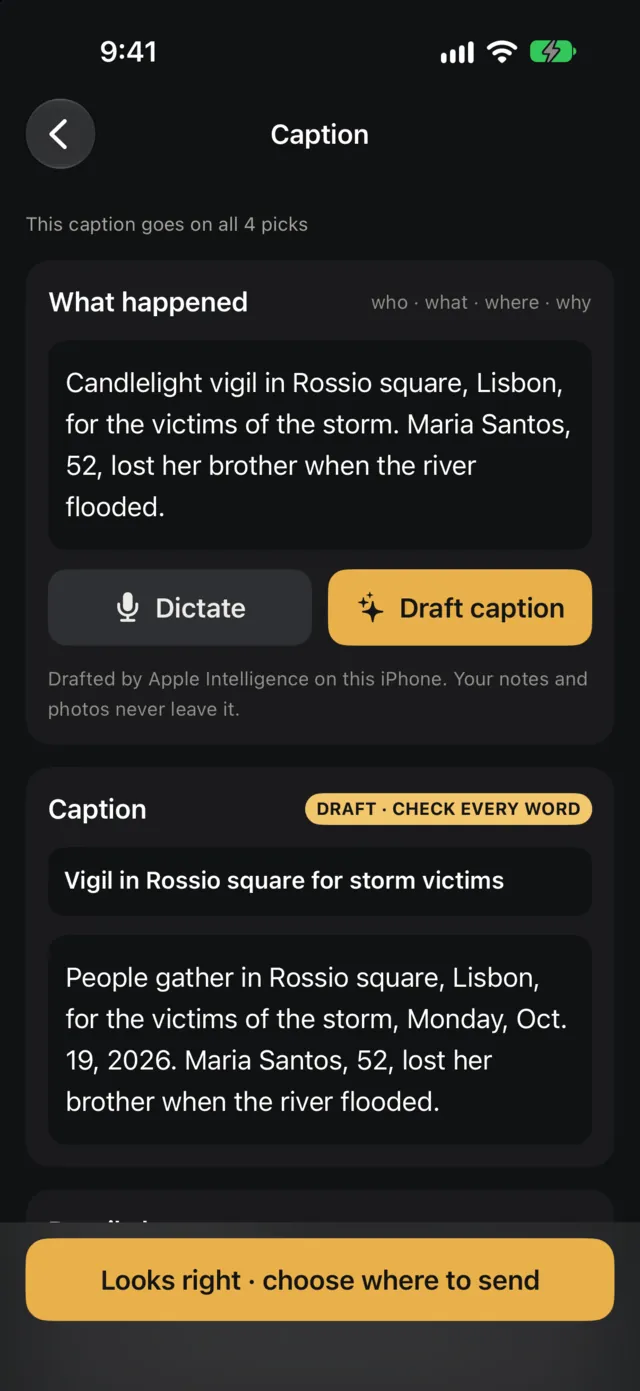
Say it once. Every photo gets its caption.
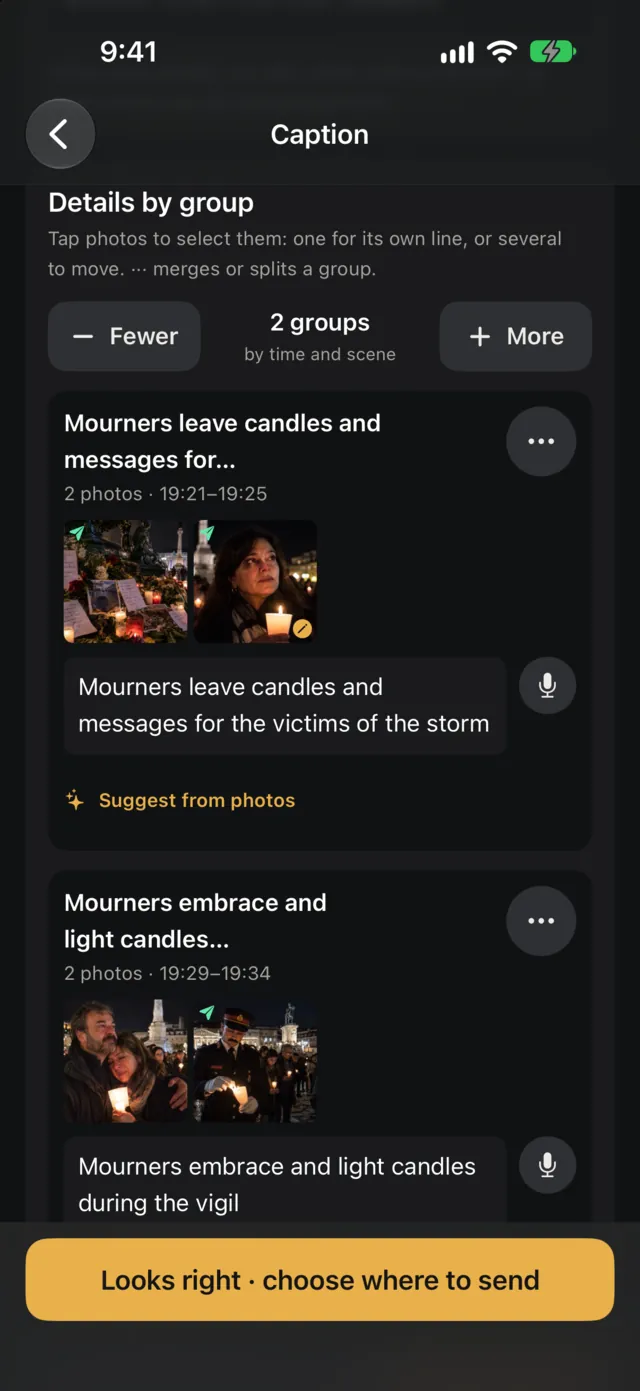
- Dictate or type what happened. Apple Intelligence drafts the headline and caption on the iPhone. Your notes don't leave it.
- One first line per scene. Photos are grouped by what they show, when and where. Give a group, or a single photo, its own line: who's in it, what they're doing.
- Place and AP-style date are added for you, from the photo's GPS or from where you are. The place name only, never coordinates.
- Signs in the photos are read on the phone, or by Apple's Private Cloud Compute if you turn it on. Tap a placard to quote it in that photo's caption.
- IPTC and XMP go into the JPEG without recompressing it. Byline, credit, copyright and keywords on every file. The camera's EXIF stays as it was.
Check
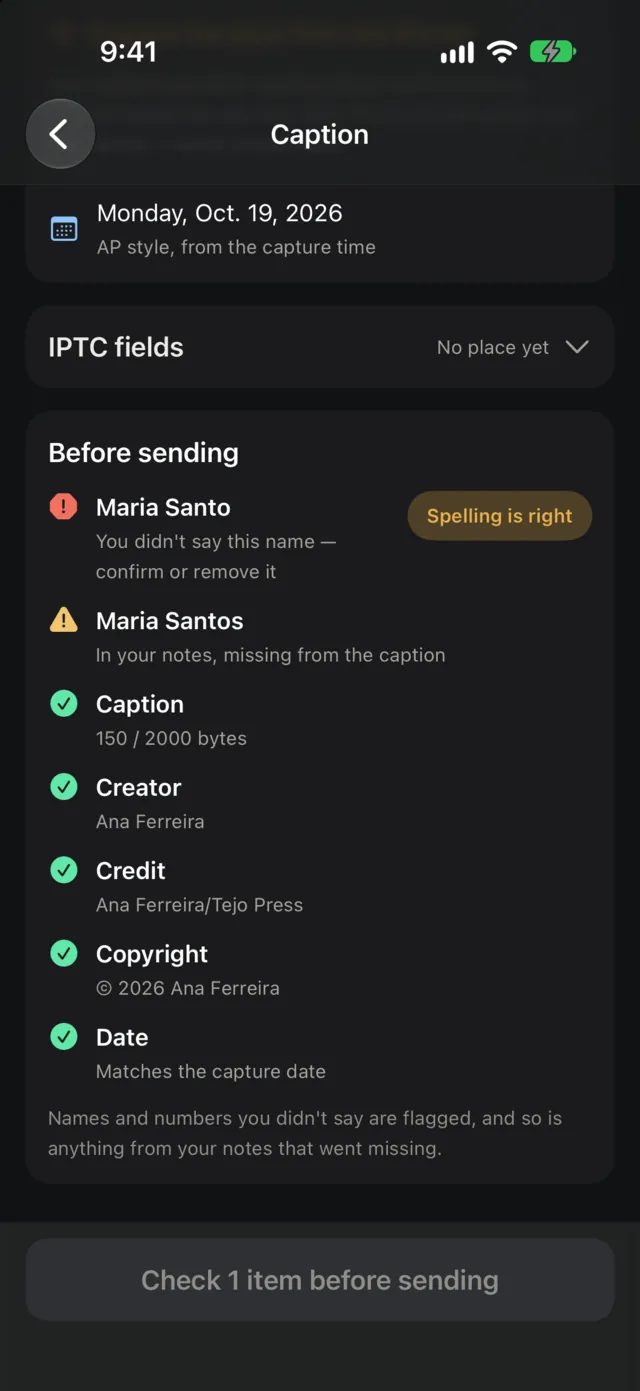
Names you never said stop the send.
Each photo's own caption is checked against your notes before anything goes.
- A name that isn't in your notes blocks sending until you confirm it or take it out. Names only ever come from your words: Pickwire doesn't recognize faces.
- Misspelled names are caught. Once you've confirmed a spelling, any other one is flagged, and one tap fixes it in the notes, headline, caption and lines.
- Numbers that aren't yours are flagged. “Twenty” and “20” count as the same.
- AI sentences that aren't mostly your words are marked “Not from your notes”.
- Names, numbers or days you said that no caption includes are listed, so nothing drops out.
- And the desk's rules: a weekday that doesn't match the date, a missing date, the copyright year, IIM length limits.
Drafts can still get the relation between two facts wrong. The checks catch names, places, numbers and days. You still read the caption.
Focus
Know which frames are sharp before you zoom.
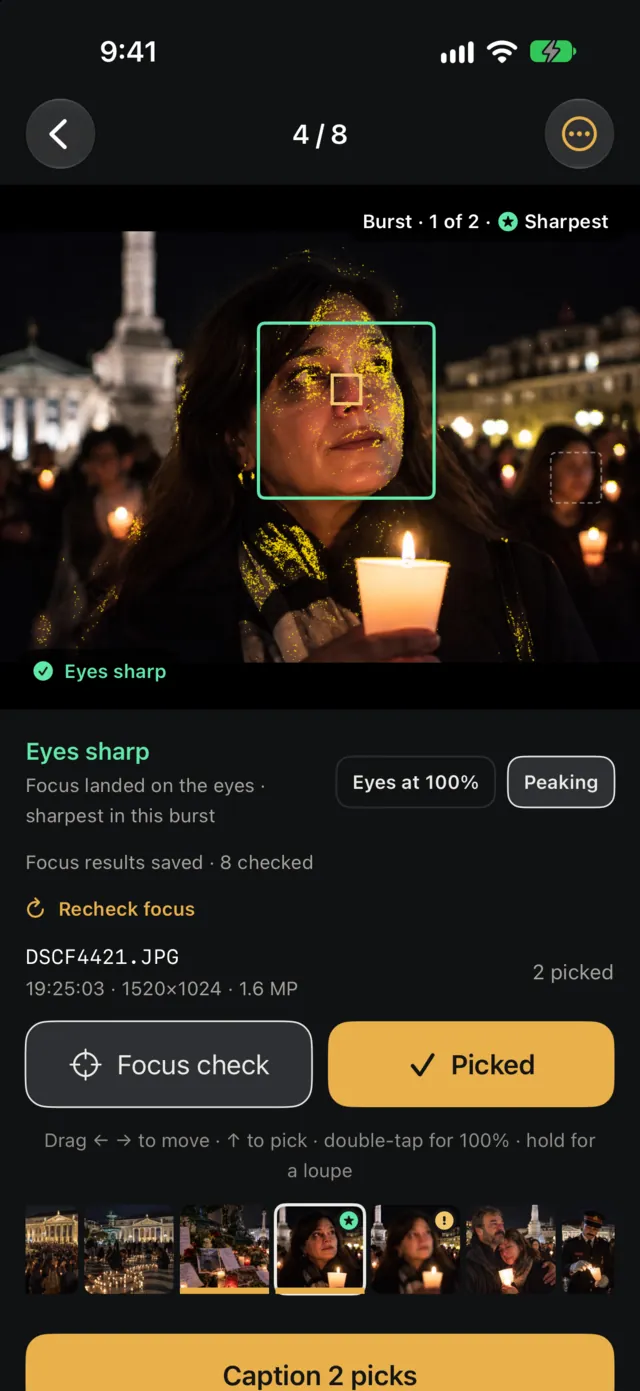
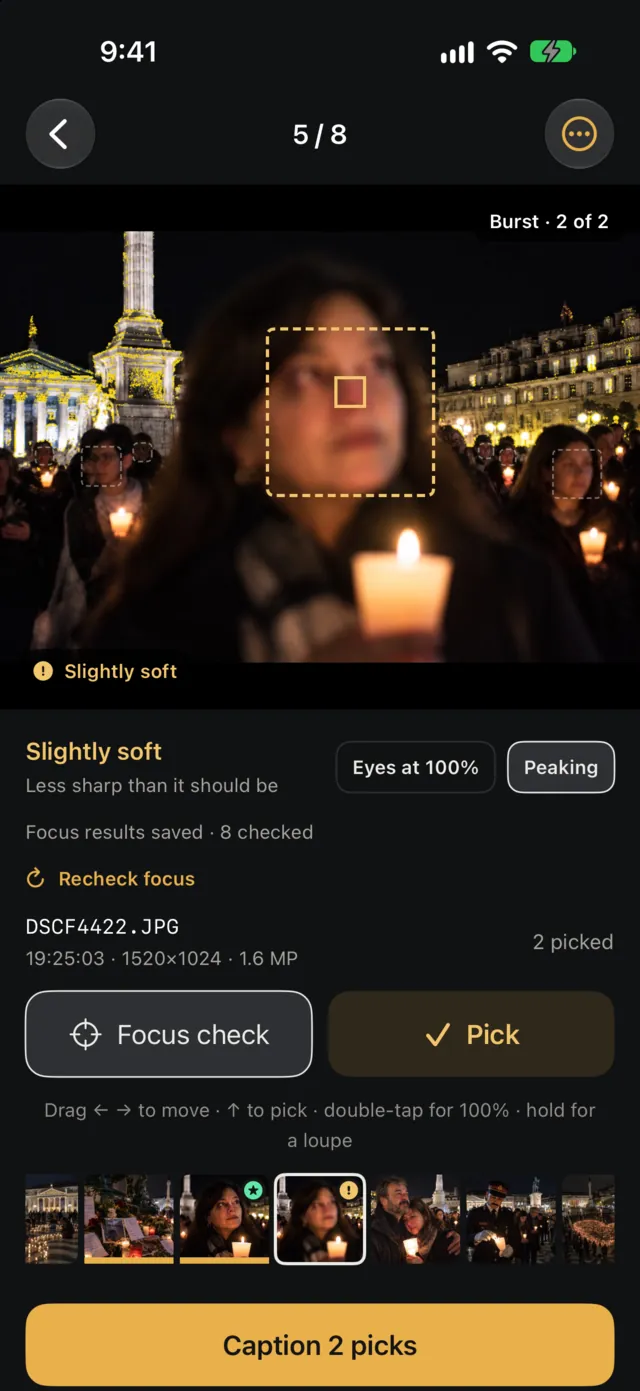
- Every photo in a story is checked on the iPhone, in about 0.6 seconds a frame on an iPhone 17 Pro. Sharp means focus landed on the eyes of the main face.
- Sharpest, Missed, Shake, Blink and Soft on the contact sheet. Filter to Flagged and cull only those.
- Face boxes, the focus point, peaking and Eyes at 100% when you want to see why.
- Drag up to pick, sideways to move. Double-tap for 100% at that spot, hold for a loupe.
- Picks can be your Photos favorites, both ways.
Everything in the first version
Stories
5
- Built from the last 30 days in Photos, split after a break (3 hours by default)
- Named after where the photos were taken; rename, join or split by hand
- Updates by itself when new photos arrive; screenshots left out
- Limit to your camera's file names, like KAA_ or DSCF
- Pick, sent and focus status on every story
Contact sheet and culling
9
- Focus check on every photo: Sharpest, Missed, Shake, Blink, Soft
- Results saved; reopening a story checks only new photos
- Filters: All, Picks, Flagged
- Drag up to pick, sideways to move, or flick
- Double-tap for 100%, hold for a loupe
- Face boxes, focus point, peaking, Eyes at 100%
- Each frame's resolution and where it was sent
- Filmstrip, landscape layout, optional haptics
- Picks as Photos favorites, both ways
Caption
12
- Dictate or type notes; Apple Intelligence drafts on the phone
- Your edits are kept if you type while it drafts
- Group by scene, with Fewer and More; merge, split, move photos
- A first line per group or per photo
- Place from the photo's GPS or from where you are, as a name
- AP-style date from the capture time
- Signs and placards read on the phone, or Private Cloud Compute if you turn it on; quoted per photo
- Keywords proposed from the caption, added to every file
- A glossary of names, with who each one is
- Optional list of well-known people from Wikidata (about 30 MB), used offline
- Editable IPTC fields; preview every file's caption
- Picks from a later batch join without upsetting your groups
Checks
9
- A name you never said blocks sending
- New names from your notes flagged for spelling once
- Other spellings of a confirmed name, fixed in one tap
- Numbers that aren't in your words
- Names, numbers or days from your notes missing from every caption
- AI sentences marked “Not from your notes”
- A line naming someone on a photo with no visible face
- Weekday and date mismatch, missing date
- Copyright year, IIM length limits, unexpanded codes
Send
9
- FTP and SFTP to any number of servers, plus Share as files
- Full size (the file as it is in Photos) or 2048 px
- IPTC and XMP written without recompressing; HEIC goes out as JPEG
- Only new picks; Resend after you fix a caption
- A folder per story:
inbox/2026-10-19_vigil-for-storm-victims - Camera file names,
20261019_AK_4425.JPG, or your own pattern - The camera's name kept in the XMP
- Byline, credit and copyright on every file
- SFTP key pinning; a warning on plain FTP
Outbox
6
- One file at a time:
.part, size check, rename - Waits for any network; survives the app being closed
- Retry failed, clear done
- Cancel a job or one photo; the half-sent file is deleted
- A notification when the batch arrives, with the desk email filled in
- Photos sent later get a follow-up under the same subject
Setup and privacy
9
- Five-step setup, every step skippable
- Asks for the microphone, location and local network only when first needed
- Your originals are never changed; captions go into copies
- Server passwords in the iOS Keychain
- Focus check, sign reading and drafts run on the iPhone
- Dictation too, in languages the iPhone can recognise itself; in others, Apple's speech recognition hears it
- Sign reading can use Apple's Private Cloud Compute, only if you turn it on
- Check now sends one person's Wikidata ID to Wikimedia, when you tap it
- No accounts, analytics or tracking; nothing from the app reaches us. What leaves the phone
What you need
- An iPhone with iOS 26 or later. An Android version comes later.
- Your photos in Photos. Import with your camera's app, a card reader or a cable; new imports show up by themselves.
- Apple Intelligence for caption drafts. Without it, Format notes tidies your own words into a caption.
- The desk's FTP or SFTP details, or nothing at all: Share as files works without a server.
Not in it yet
- FTPS. Plain FTP works but shows a warning. Use SFTP where the desk has it.
- Photo Mechanic code replacement.
- Import straight from the camera over USB-C.
- Safety mode: GPS and serial numbers stripped, faces hidden on request.

Not on the App Store yet.
Leave your email and you'll get one message when Pickwire is out.